VA Appeals Software
Designing new features for better efficiency
Caseflow is a SaaS product created for the VA to modernize the appeals process for Veterans. Caseflow Reader was designed to help attorneys and Board staff review thousands of documents per case.
Client
Department of Veterans Affairs
Services
Visual Design UX Design UX Research Project Management
Industries
Government IT Services
Date
February 2025 - June 2025
Role & Responsibility
My role was to lead all design Caseflow Reader. I was in charge of:
→ Leading UX Research exploration and testing
→ Building new features according to research
→ Working with Engineering to understand API limitations and feasibility
→ Collaborating with The Board of Veterans Appeals to understand business goals
→ Speaking with attorneys and judges to understand their work flow and issues they run into
Role & Responsibility
My role was to lead all design Caseflow Reader. I was in charge of:
→ Leading UX Research exploration and testing
→ Building new features according to research
→ Working with Engineering to understand API limitations and feasibility
→ Collaborating with The Board of Veterans Appeals to understand business goals
→ Speaking with attorneys and judges to understand their work flow and issues they run into
Business Goals
The Board of Veterans Appeals approached our team after internal data revealed that attorneys and staff were spending the most time within Caseflow Reader compared to any other tool in the appeals suite. Reader had become a bottleneck: case files often contained thousands of documents, and users struggled to efficiently navigate, search, and manage this volume of information.
The VA’s business goals for this project were clear:
Streamline navigation and search so attorneys could locate evidence across large case files without manual workarounds.
Reduce wasted time caused by blank, duplicate, or irrelevant documents.
Improve efficiency and throughput in case reviews to directly support backlog reduction.
Build trust in Reader so it became a tool attorneys wanted to use, not one they worked around.
By addressing these goals, the VA aimed to improve the overall appeals workflow, enabling attorneys to reach decisions faster and deliver more timely outcomes for Veterans.
Business Goals
The Board of Veterans Appeals approached our team after internal data revealed that attorneys and staff were spending the most time within Caseflow Reader compared to any other tool in the appeals suite. Reader had become a bottleneck: case files often contained thousands of documents, and users struggled to efficiently navigate, search, and manage this volume of information.
The VA’s business goals for this project were clear:
Streamline navigation and search so attorneys could locate evidence across large case files without manual workarounds.
Reduce wasted time caused by blank, duplicate, or irrelevant documents.
Improve efficiency and throughput in case reviews to directly support backlog reduction.
Build trust in Reader so it became a tool attorneys wanted to use, not one they worked around.
By addressing these goals, the VA aimed to improve the overall appeals workflow, enabling attorneys to reach decisions faster and deliver more timely outcomes for Veterans.
What Users Said
To better understand how Caseflow Reader was being used in practice, I conducted five interview sessions with subject matter experts (SMEs). These conversations focused on observing their workflows, documenting pain points, and identifying where inefficiencies were slowing down the appeals process.
From these sessions, three clear and actionable takeaways emerged:
Ineffective Search
Users could only search within one document at a time (often requiring them to hit F5 and repeat searches across hundreds of PDFs).
This slowed down case reviews significantly and led to missed evidence.
Difficulty Comparing Documents
Attorneys frequently needed to cross-check information but had no way to view two documents side by side.
They resorted to opening multiple tabs or windows, which disrupted focus and increased errors.
Tagging Misuse
The existing tagging system wasn’t used as intended.
Attorneys either ignored tags or used them inconsistently, making case files cluttered and reducing confidence in Reader’s organizational features.
These insights gave us a clear direction: focus on improving search, enabling comparison, and redesigning tagging to align with real attorney workflows.
What Users Said
To better understand how Caseflow Reader was being used in practice, I conducted five interview sessions with subject matter experts (SMEs). These conversations focused on observing their workflows, documenting pain points, and identifying where inefficiencies were slowing down the appeals process.
From these sessions, three clear and actionable takeaways emerged:
Ineffective Search
Users could only search within one document at a time (often requiring them to hit F5 and repeat searches across hundreds of PDFs).
This slowed down case reviews significantly and led to missed evidence.
Difficulty Comparing Documents
Attorneys frequently needed to cross-check information but had no way to view two documents side by side.
They resorted to opening multiple tabs or windows, which disrupted focus and increased errors.
Tagging Misuse
The existing tagging system wasn’t used as intended.
Attorneys either ignored tags or used them inconsistently, making case files cluttered and reducing confidence in Reader’s organizational features.
These insights gave us a clear direction: focus on improving search, enabling comparison, and redesigning tagging to align with real attorney workflows.
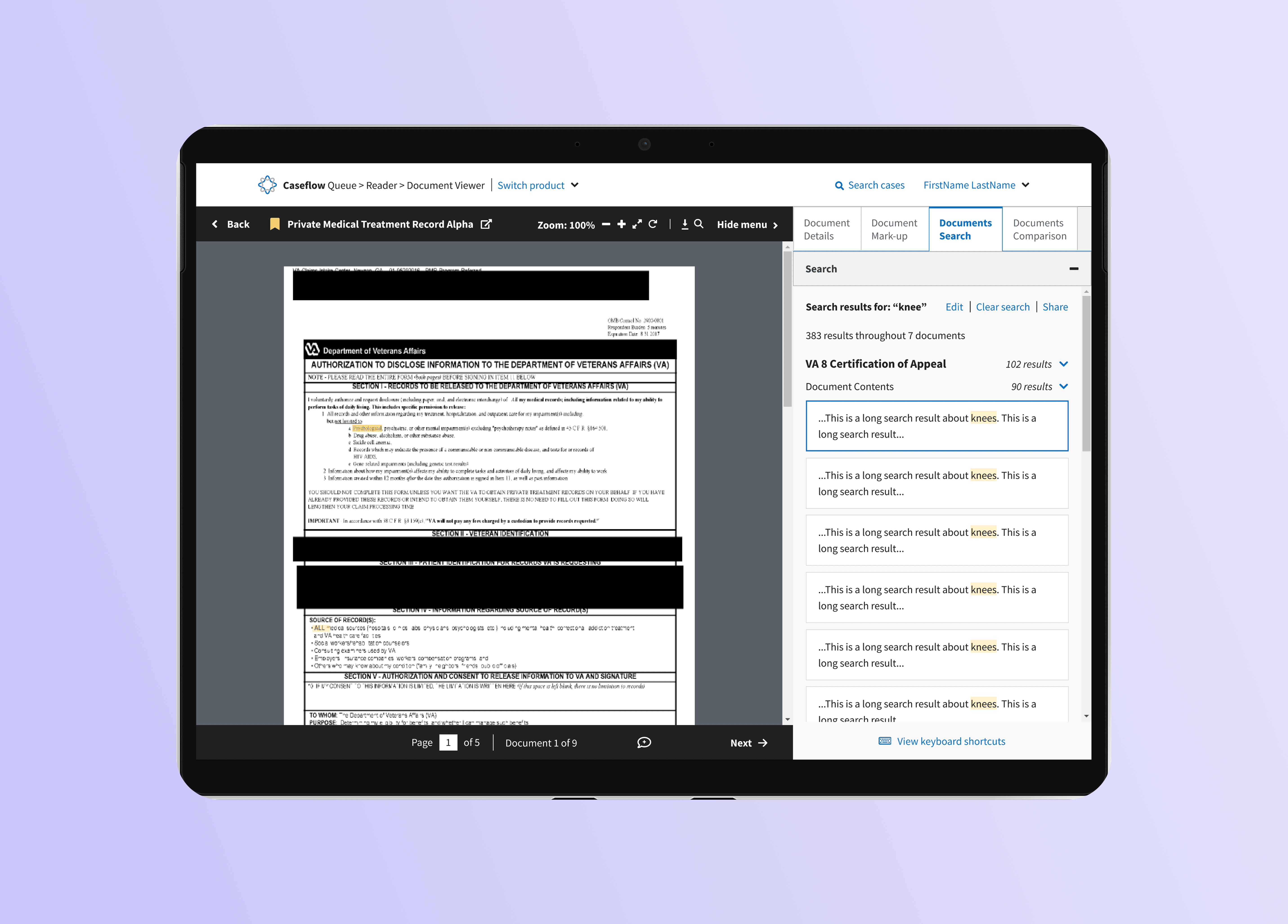
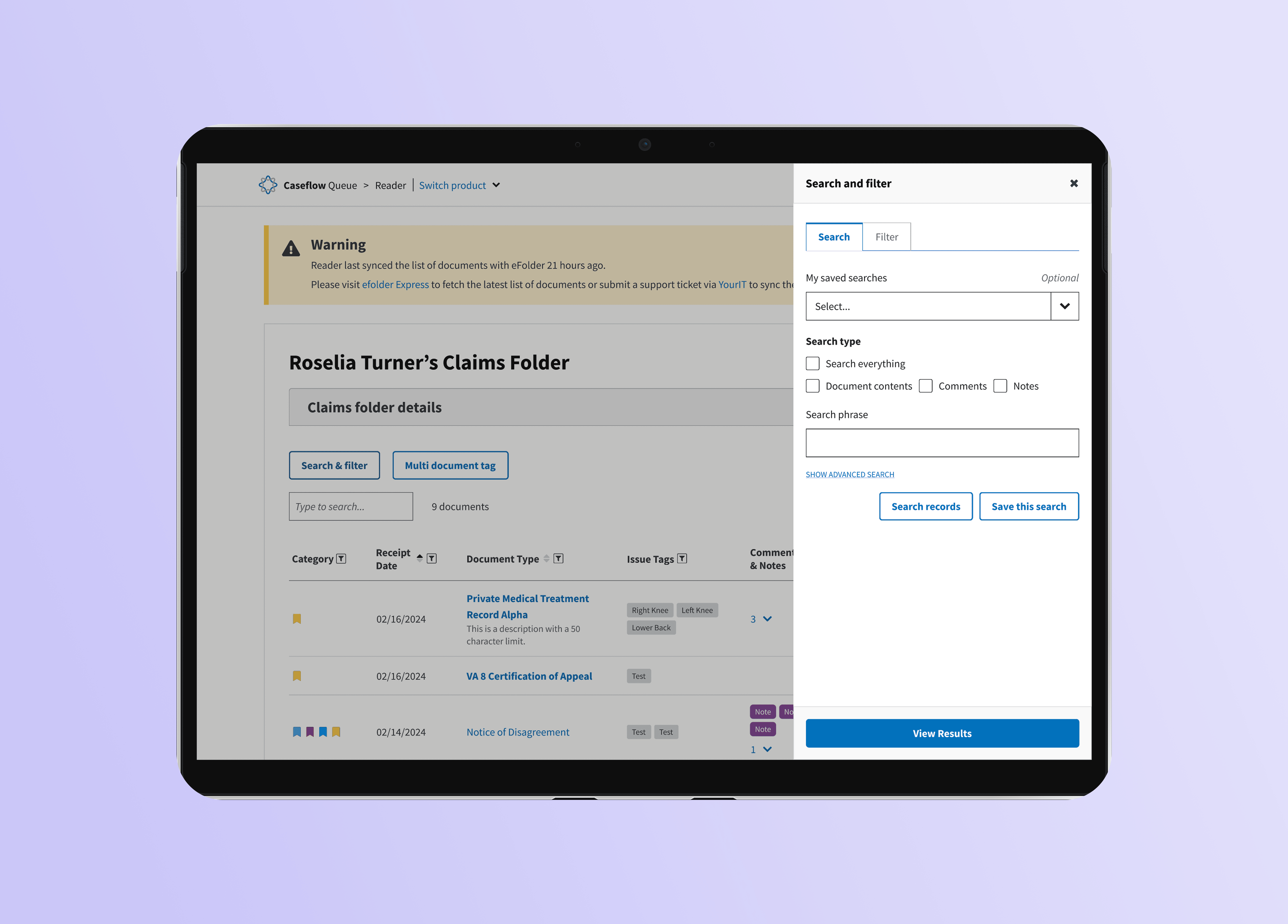
Universal Document Search
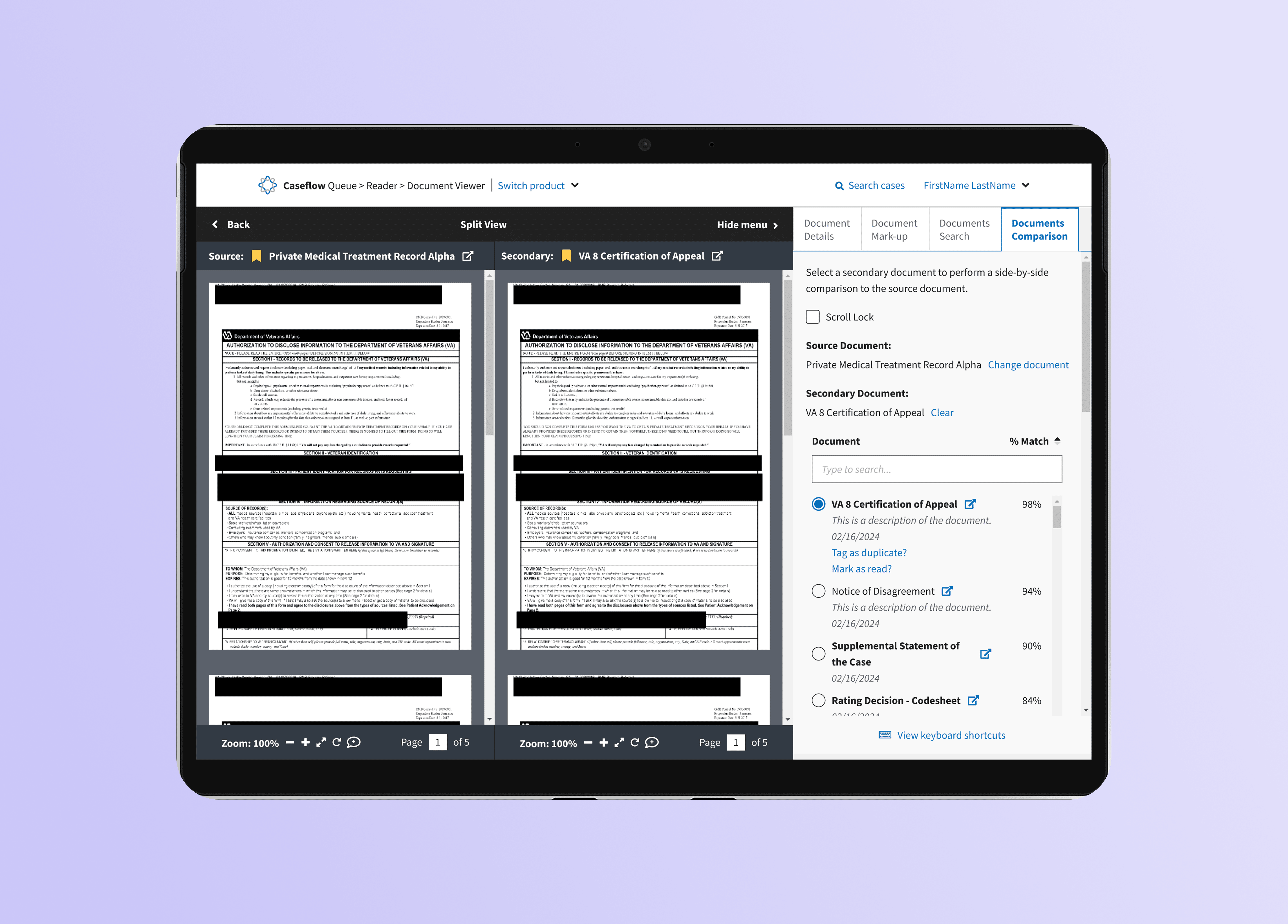
Document Comparison
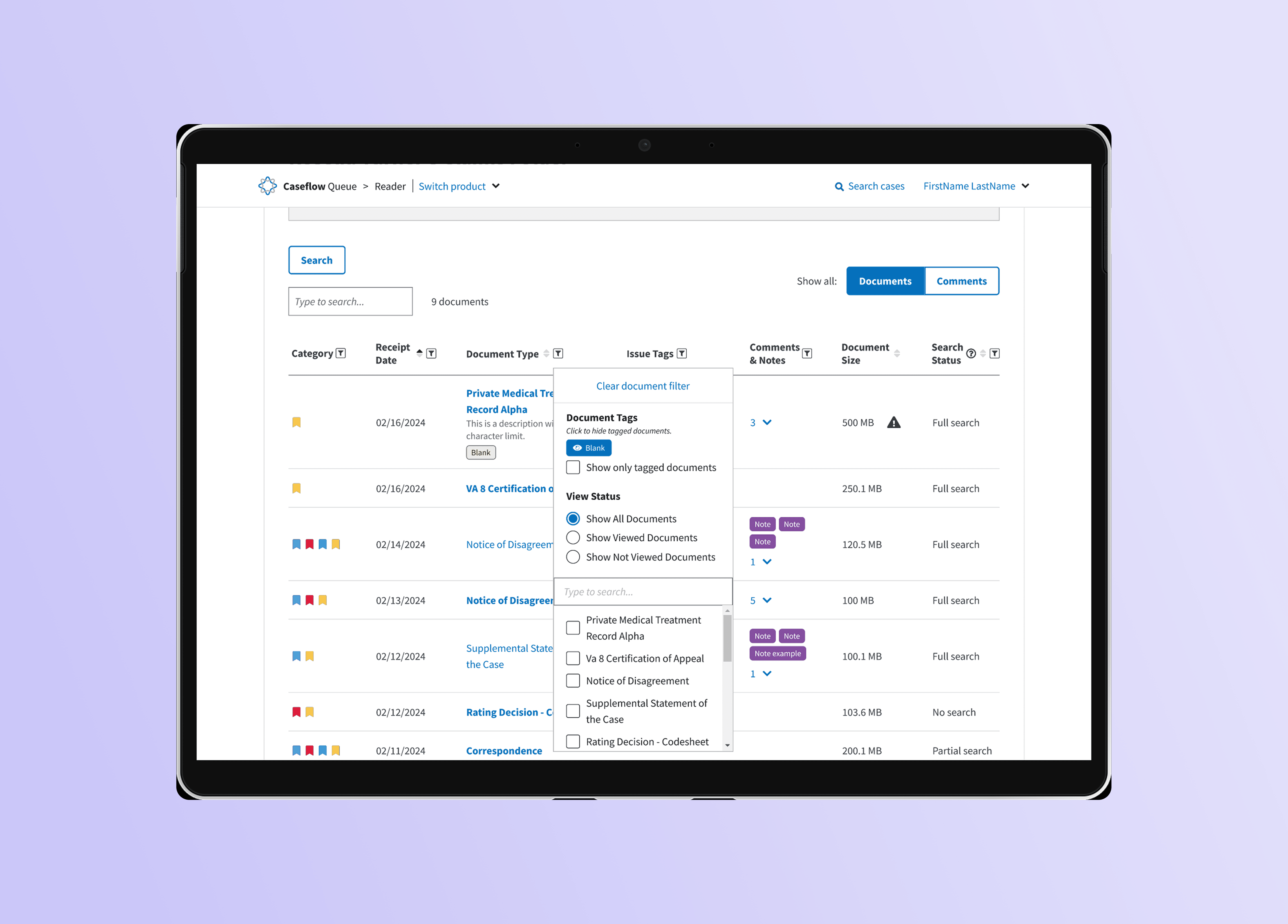
Document Filtering
Universal Document Search
Document Comparison
Document Filtering
Conclusion
Because of technical limitations with the Smart Search API, we prioritized delivering value through a phased rollout of new features in Caseflow Reader.
Phase 1: Launch a universal search across all case documents, with additional functionality for filtering and saving searches planned for later iterations.
Phase 2: Introduce a document comparison view, enabling attorneys to review evidence side by side without juggling tabs.
Phase 3: Release the redesigned tagging and filtering system to help attorneys clean up clutter and manage case files more efficiently.
During user testing, attorneys and staff expressed strong excitement about these changes, especially universal search, which immediately addressed one of their most frustrating pain points. Even in early stages, the project demonstrated that incremental improvements could significantly boost efficiency, trust, and adoption of Reader as a daily tool.
Conclusion
Because of technical limitations with the Smart Search API, we prioritized delivering value through a phased rollout of new features in Caseflow Reader.
Phase 1: Launch a universal search across all case documents, with additional functionality for filtering and saving searches planned for later iterations.
Phase 2: Introduce a document comparison view, enabling attorneys to review evidence side by side without juggling tabs.
Phase 3: Release the redesigned tagging and filtering system to help attorneys clean up clutter and manage case files more efficiently.
During user testing, attorneys and staff expressed strong excitement about these changes, especially universal search, which immediately addressed one of their most frustrating pain points. Even in early stages, the project demonstrated that incremental improvements could significantly boost efficiency, trust, and adoption of Reader as a daily tool.